


South China Morning Post
4.5280.00 Reviews
App Specs
- Version
- 7.2.1
- Updated On
- License
- Free
- Downloads
- 500,000+
- Developer
- SCMP Publishers Limited
- Categories
- News & Magazines
- Platform
- Android, iOS
Screenshots







 Analysis by AppCompare
I find South China Morning Post most useful when I want a closer view of Hong Kong, China and the wider Asian region rather than another feed led mainly by US or European headlines. It is a news app from SCMP Publishers Limited, and its regional focus gives it a clear purpose: it can sit alongside a broad general-news source, while offering a more Asia-centered reading habit. That distinction matters most when a developing story has local context that a quick international roundup may not have room to explain.
A regional lens for a busy news day
In a typical morning routine, I might check a few headlines over breakfast, then return later to read one story properly. This app suits that pattern better than endlessly refreshing a social feed: I can use it to scan current coverage, pick a topic that matters to me, and spend time with a fuller article. If I follow business developments in China, events in Hong Kong, or regional affairs across Asia, the editorial focus makes the reading feel more purposeful than a generic list of trending stories.
That focus is also a boundary. Someone who wants equal depth on every country and every subject may prefer a large international outlet or a news aggregator that gathers many publishers in one place. I would not treat this as a complete replacement for every other source. I see it as a useful specialist perspective, especially when the region is central to a story, and a complement to broader coverage when it is not.
Who is likely to get the most from it
I’d recommend it to readers who regularly follow Asian current affairs, people with family or work connections in the region, and anyone who wants more context than a headline and a short alert can provide. It can also help readers who are learning about the region: following coverage over time gives individual events a wider frame, rather than leaving them as isolated notifications.
On the other hand, if you only open a news app occasionally and mainly want a quick digest of local weather, sports scores, or neighborhood updates, a broad regional newspaper or a general-purpose news service may fit your routine better. The value here depends on whether SCMP’s subject and geographic emphasis match what you actually want to read. A focused publication is a strength when its focus is yours; it can feel narrow when it isn’t.
Practical ways to make reading more deliberate
One useful habit is to treat alerts as prompts, not as a reading plan. Breaking-news notifications can draw attention to a major event, but they rarely provide all the context needed to understand it. I’d open the related coverage when a story affects a topic I follow, then set aside time for a longer read instead of letting a stream of alerts dictate the whole day. Keeping notifications selective is a simple way to stay informed without turning every update into an interruption.
For a commute or a patchy connection, saving a small set of articles before leaving is more reliable than assuming every page will load when needed. I’d choose pieces I genuinely intend to finish, rather than saving every headline that looks interesting; that keeps an offline reading queue manageable and makes it easier to return to the important stories. If an article is especially useful for a conversation or a later reference, the sharing option can also help me send the original piece rather than trying to summarize it from memory.
Worth Reading Before You Choose

EA SPORTS FC Mobile 26 Is a Bigger Football Game, but It Takes Time

Flipboard Shows What News Apps Must Do Beyond the Feed

Switching to Android Auto Means Rethinking Your Driving Routine

Google Calendar Makes a Crowded Week Easier to Manage

Ludo King Makes the Most of the Minutes Between Plans

Baby Panda World Brings Quick Play to Modern Phones, but Its Game Library Feels Busy
When I’m exploring a subject rather than checking the latest headlines, search can be a better starting point than scrolling. Looking up a person, place, or issue lets me move from a current report toward related coverage, which is often a more useful way to build context. I would still compare important claims with other reporting, especially on complicated or fast-changing stories; having a preferred publication is not a reason to stop reading critically.
Getting Started
First things first, downloading the South China Morning Post app was a breeze. Available on both Android and iOS, it’s just a few taps away on your preferred app store. Once you have it installed, the setup is straightforward. No complicated registration processes or lengthy forms to fill out. Within minutes, you’re in the app and ready to explore.
User Interface and Experience
The first thing that caught my eye was the sleek design. The layout is clean and modern, which makes navigation a piece of cake. Each section is clearly marked, and the search functionality is top-notch, allowing you to find articles on specific topics effortlessly. I also appreciate the dark mode feature, perfect for nighttime reading without straining your eyes.
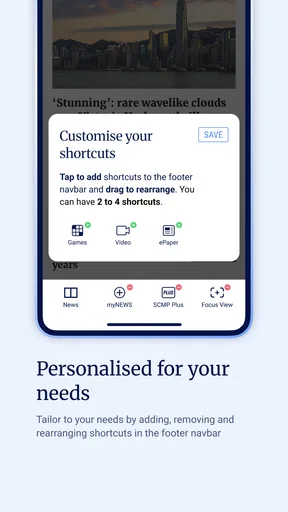
What’s really cool is how customizable the app is. You can tweak your feed to prioritize the categories you care about most, whether it’s politics, business, or lifestyle. This personalized touch makes it feel like the app is tailored just for you.
For a more useful feed, I’d start by choosing a few subjects I genuinely follow instead of trying to make it represent every interest. A narrow selection makes it easier to spot relevant stories during a quick check, while search remains available when a major event takes me outside those usual topics. I also find that a customized feed works best as a shortcut, not a filter for what deserves attention: an unexpected regional story may matter even if it does not match my routine interests.
Content and Features
Now, let’s talk about content. The app offers a rich array of articles, ranging from breaking news to in-depth features and opinion pieces. The coverage is primarily focused on Asia, with a particular emphasis on China, but you’ll also find plenty of international news to keep you in the loop globally. What I love is the inclusion of multimedia elements. Videos and photo galleries are seamlessly integrated, adding depth to the stories.
Another feature worth mentioning is the push notifications. They’re timely and relevant, ensuring you never miss out on major news events. And don’t worry about being bombarded with alerts; you have full control over which notifications you receive.
The mix of formats changes how I use the app. A visual gallery can give a story a sense of place that a short text update lacks, while a reported feature is better when I want background and explanation. I would not assume that every developing story is best understood through a clip or a single alert; opening the written coverage is often the more thoughtful next step. For a reader who prefers text-only browsing, the multimedia is an extra rather than a reason to install it.
It is also worth thinking about the difference between a reported article and an opinion piece. Both can be valuable, but they answer different questions: one may help establish what is happening, while the other makes an argument about what it means. When I’m forming a view on a sensitive issue, I try to notice which kind of piece I’m reading and then look for additional reporting before treating a single interpretation as settled fact.
Performance and Reliability
In terms of performance, the app runs smoothly without any hiccups. During my time using it, I didn’t encounter any crashes or bugs, which is a huge plus. Whether I was connected to Wi-Fi or using mobile data, the app loaded quickly, and the articles were ready to read within seconds.
Moreover, the offline reading feature is a lifesaver for those times when you’re on the go without internet access. Simply save the articles you’re interested in, and read them at your convenience.
Offline access is most useful when I plan ahead: for example, I can save a longer read before boarding a train, then use that time for an article I would otherwise postpone. It is less helpful if I expect the offline queue to update itself with the latest developments, so I would check the saved pieces before disconnecting and refresh them when I’m back online. That small routine makes the feature practical without confusing saved reading with live coverage.
Costs, access and staying current
The app is free to install and is rated for Everyone, so it is easy to try as a reader without first making a purchase decision. Its average score is 4.6 from around 6,300 ratings, with 281 written reviews, and it has passed 500,000 installs. Those figures suggest a well-established audience, but they cannot tell me whether the publication’s mix of topics will suit an individual reader. I’d judge that by trying the app against my own news habits.
There are in-app purchases, with individual items ranging from $0.99 to $384.99. That is a wide span, so I would check the purchase details shown in the app before confirming anything and make sure I understand what an item provides. The free download should not be mistaken for a promise that every form of access or content is included at no cost. If I only want to browse casually, I would first see how far the available reading takes me before deciding whether any paid option is worthwhile.
The current version is 7.1.15, and the app’s release history begins on May 27, 2013. That long-running presence tells me this is an established product rather than a new experiment, while the current version number identifies the build available now. It does not, by itself, reveal which specific features have changed over time, so I would avoid assuming a particular redesign or capability was introduced in a particular update. For an existing reader, the sensible approach is to keep the app current and judge changes by how the daily reading experience actually feels.
Where it fits among other news apps
Compared with a news aggregator, this is a more publication-centered choice: I come for SCMP’s reporting and regional lens, not a single blended feed assembled from many outlets. An aggregator can be better when I want to compare headlines from different publishers quickly or cover a wider range of local topics. A broad international newspaper may be a better main app if my priority is balanced attention across continents. I’d use this one when Asia-related coverage deserves a dedicated place in my routine.
That distinction can help avoid a common news habit: mistaking a large number of headlines for a complete picture. A single publication offers continuity and a recognizable editorial voice, but it also reflects one newsroom’s selection of stories. For major developments, I’d use the app to understand its reporting and then consult another credible source if I need a wider range of perspectives. That is not a knock against the app; it is a sensible way to read any one outlet closely.
Changes, expectations and limits
As a product with a current build numbered 7.1.15 and a release history stretching back to 2013, it has had time to become a familiar tool for regular readers. The facts available here establish that it is maintained as a current app, but they do not identify a particular recent redesign or a new feature rollout. I would separate that evidence from expectation: I hope future versions keep the reading experience clear and the controls easy to find, but that is what I would like to see, not a claim about what the next update will contain.
The app is not the right answer for everyone. If my main need is a customizable cross-publication briefing, I would choose an aggregator; if I want comprehensive local reporting for another country, I would add a publication that specializes there. And if I dislike push alerts, I would turn them down rather than let them define the experience. Even a strong news app can become tiring when I ask it to cover needs beyond its editorial focus or allow notifications to interrupt too often.
Why You Should Try It
If you’re still on the fence about giving this app a go, let me highlight a few reasons why it’s worth your time. First, the depth and quality of the journalism are remarkable. Each article is well-researched and provides insights that are both informative and engaging. Plus, the app’s ability to cater to your preferences makes it a must-have for any news enthusiast.
And let’s not forget the social sharing options. With just a tap, you can share articles directly from the app to your social media platforms, keeping your friends and followers informed as well.
In summary, the South China Morning Post app is a fantastic tool for anyone who wants to stay informed with high-quality journalism and a user-friendly experience. Whether you’re interested in local Asian news or global affairs, this app has got you covered. So why not give it a try? You might just find that it becomes your go-to source for news.
My recommendation in everyday use
My practical recommendation is to give it a short trial as a focused regional source: follow the subjects that matter to you, keep alerts limited to genuinely useful updates, and save a few substantial articles for offline reading. That routine makes it easier to see whether the coverage earns a regular place on your home screen without asking it to replace every other source you use.
I’d keep it if I wanted a consistent way to follow Hong Kong, China and Asian affairs, especially when I value reported context as well as breaking updates. I’d skip it if my reading is mostly about unrelated local services, or if I expect one app to provide a complete, neutral survey of every region and viewpoint. For me, its strongest role is clear and specific: a convenient window into a part of the news that can be underrepresented in broader daily briefings.
Pros
- Comprehensive news coverage from Asia.
- User-friendly interface for easy navigation.
- Regular updates with breaking news.
- In-depth analysis by experienced journalists.
- Customizable notifications for preferred topics.
Cons
- Some features require a subscription.
- Occasional ads in the free version.
- Content is mainly in English.
- Limited offline reading options.
- High data usage for video content.
FAQs for South China Morning Post
What features does the South China Morning Post app offer?
The South China Morning Post app provides users with comprehensive news coverage, including breaking news alerts, in-depth analysis, and exclusive reports. It also offers multimedia content such as videos and podcasts, a customizable news feed, and offline reading capabilities. Users can follow specific topics or authors to tailor their news experience.
Is the South China Morning Post app free to use?
The app is free to download and offers some content at no cost. However, for full access to premium articles and exclusive features, users may need to subscribe to a paid plan. Subscription options typically include monthly or annual payments, and promotions may be available for new users.
How frequently is the content updated on the app?
The South China Morning Post app is updated regularly throughout the day, ensuring users receive the latest news as it happens. Breaking news alerts are sent in real-time, while new articles and multimedia content are continuously added to provide up-to-date information across various topics.
Can I customize my news feed on the South China Morning Post app?
Yes, the app allows users to personalize their news feed. You can select specific topics, regions, or authors to follow, ensuring that the content you see is relevant to your interests. This customization feature enhances the user experience by providing a tailored news selection.
Does the app support offline reading?
The South China Morning Post app includes an offline reading feature, allowing users to download articles and read them without an internet connection. This is particularly useful for users who want to stay informed while traveling or in areas with limited connectivity. Simply download articles in advance to access them anytime.


